



Best Easy Digital Downloads Social Login Plugin
EDD Social Login
Streamline account creation and checkout authentication for Easy Digital Downloads by allowing buyers to log in through popular social media profiles using our EDD Social Login extension. It helps reduce checkout friction, increases conversion rates, and eliminates forgotten password issues for returning digital product buyers by directly integrating one-click authentication.


Social Authentication Built for Easy Digital Downloads

Let Customers Register With a Social Account
Instead of going through an extensive registration process, new customers can immediately create a store account using their preferred social media profile with this extension. This eliminates password fatigue while offering a seamless onboarding experience.

Add Social Sign-In to Your Checkout
Add the most popular and widely used social media login options directly on your Easy Digital Downloads checkout page. Embed user account access within the conversion funnel, allowing returning buyers to sign in easily without leaving the checkout page.

Connect Social Login to Existing Customer Accounts
With this extension, you can enable customers to link social profiles to their existing store accounts automatically when matching email addresses are detected. It also helps prevent duplicate accounts while ensuring that returning shoppers can instantly sign in using their social credentials.

Give Customers Control Over Linked Accounts
You can easily manage, link, or disconnect social accounts directly from your account dashboard. It keeps the WordPress accounts underneath secure and active while ensuring that access is not lost when unlinking a provider.

Choose Where Customers Go After Login
Set up personalized post-login redirect URLs to direct users right after they authenticate. This allows you to direct shoppers to their customer account page, digital product catalog, or a customized Thank You page, maximizing post-login engagement.

Display Login Buttons Beyond Checkout
Use dedicated shortcodes, widgets, or Gutenberg editor blocks to integrate social login buttons across any page. Use this feature to place a sign-in option wherever customers need account access on your site.

Invite Customers to Connect After Purchase
Give signed-in customers the option to link a social account from the Thank You page. Buyers can finish their purchase first and connect an account for future visits afterwards.
Add Social Login to Your Login Pages
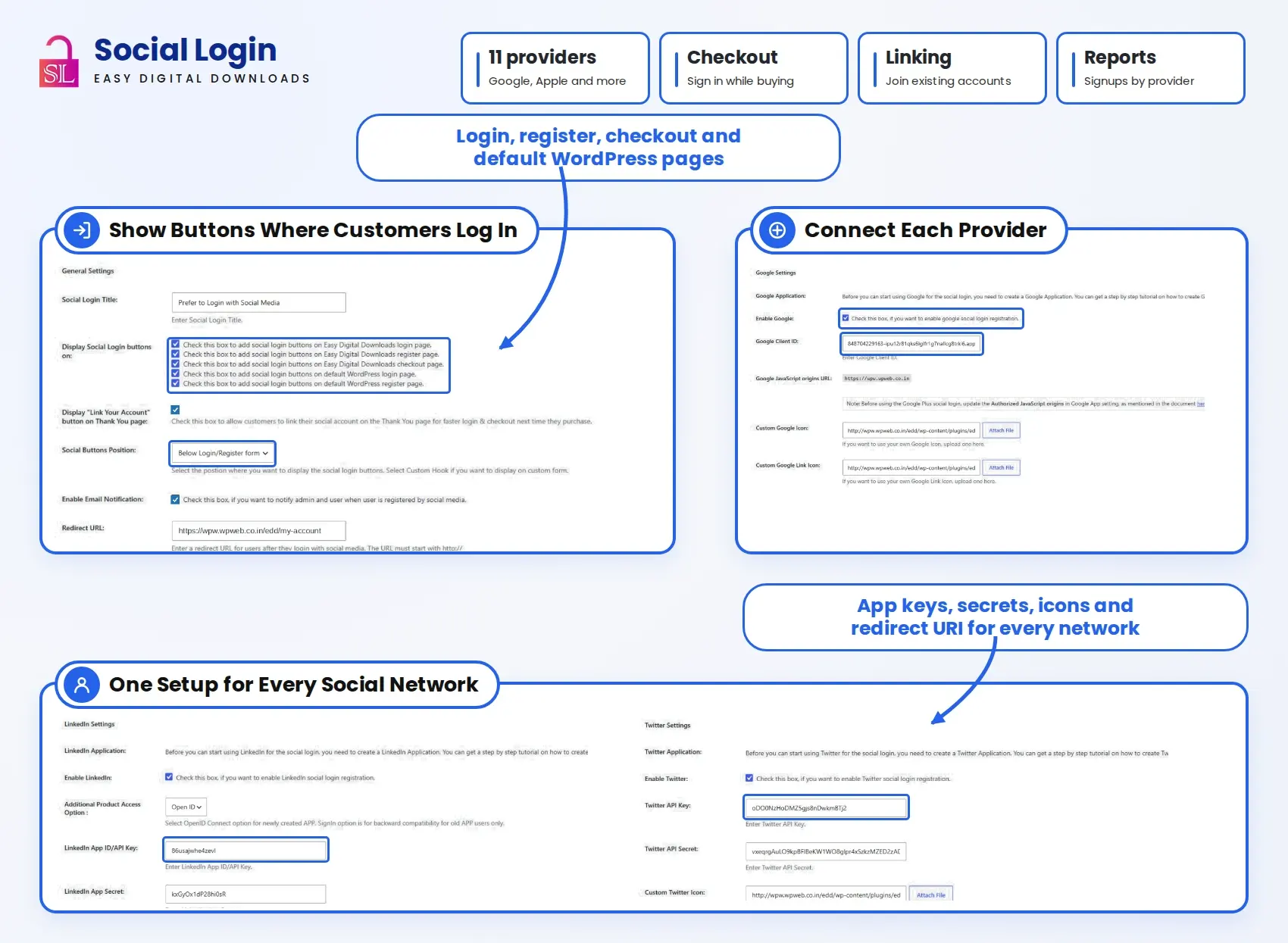
Simplify account access by allowing customers to sign in with their preferred social media accounts. Easily enable social login buttons on both Easy Digital Downloads and default WordPress login pages. Customers can log in without remembering additional usernames or passwords, making the sign-in process quicker, easier, and more convenient.

Control Button Placement and Provider Order
Choose whether social login buttons appear above or below the login and registration form. Arrange providers through drag and drop so your preferred sign-in options appear first.

Match Login Icons and Headings to Your Store
Use custom provider icons and edit the heading displayed above your social login buttons. Make the sign-in area feel consistent with the rest of your store while keeping each provider easy to recognise.

Send Notifications for Social Registrations
Enable email notifications when a customer registers through social login. Notify the customer and administrator about the new registration without checking the user list manually.

Track Registrations by Login Provider
See how many customers register through each provider, along with a percentage breakdown in a pie chart. Use the report to understand which sign-in options your customers actually choose.

View Linked Social Profiles in WordPress
Check a user’s primary social profile from the WordPress user list. Open their profile to see primary and linked account information when reviewing how their store account is connected.
Accelerate Digital Downloads with One-Click Social Checkout

Transparent Pricing Plans
Select a suitable plan for your online store to reduce checkout friction, streamline customer registration, and get access to regular plugin updates and dedicated support.
1 Website
Includes all plugin features, updates, and support throughout your subscription.
3 Website
Includes all plugin features, updates, and support throughout your subscription.
Unlimited Websites
Includes all plugin features, updates, and support throughout your subscription.
EDD Social Login Features Included in Every Plan
Choose how customers sign in, where login buttons appear, and what happens next.
- Social Account Registration
- Checkout Login Integration
- WordPress Login Page Buttons
- Custom Login Redirects
- Social Account Linking
- Custom Provider Icons
- Thank You Page Connections
- Shortcode Placement
- Widget Support
- Gutenberg Block
- Drag-and-Drop Provider Ordering
- Registration Email Notifications
14-Day money-back guarantee. No questions asked!
We stand by our product. Purchase any plan with complete confidence knowing you are eligible for a refund within 14 days if the add-on doesn't meet your needs.
Discover what our customers have to say about their experience with our plugins. Read genuine reviews and see how our solutions help businesses simplify their workflow. 5.0/5
Are you a customer? CodeMaster_Hub This plugin is great. I configured everything quickly and it works fine. What was very interesting to me is that the social login buttons can be added to the default WordPress login form in addition to EDD Form. Highly recommended. UIdeck Swift response by the team, highly recommended! RoteRosen78 EDD Social Login Plugin is a great plugin and WPElite’s Team actually helped us to immediately address a small feature request. Its an essential tool to ensure User Login and Sign-ups go smoothly and we do not loose any visitors in the process. We use it on various parts of our EDD Website, Login but also Checkout and even some custom popup forms. It all works. Can only recommend it.All Ratings & Reviews
Submit your review
Feature Availability
Customer Support
Customer Support
More Screenshots
Technical Info


Frequently Asked Questions
All features included on every plan. Pick the license that fits your store.

Yes, existing customers can automatically link their shopping accounts when their social account provides a matching email address. Of course, it comes with provider and account-role restrictions.
Yes, customers can disconnect their linked accounts at any time from My Account.
Yes, customers can still sign in with their existing shopping or site account without having to link it to a social profile. It’s a feature provided to them to avoid creating or remembering a password for shopping. But if they opt out of linking to a social account, they need to reset the password and use standard login.
No, if you remove the plugin, then customers won’t lose their existing WordPress site accounts. Once the plugin is removed, customers need to use password recovery to regain standard account access.
As stated in the documentation, the plugin only exchanges the login information with the social providers and not any kind of site activity or order history.
The login buttons might be missing when you test because you are already signed in, which keeps the button hidden. Log out or test in a private browser window.
All EDD Social Login plugin plans, whether Starter, Business, or Agency, provide 1 year of plugin updates and support, ensuring you receive the latest features, improvements, and assistance whenever needed.
Simple Social Provider Integration
Link your favourite social authentication channels using simple setup guides for quick, effortless integration.